
University timetables in FET: too many electives, too few hours
Make a university timetable in FET before students choose their electives. Two FET rules keep required courses free and electives apart.
Every August, a university timetable office faces the same puzzle. The new timetable must go online before students choose their electives. Students read it first, and they choose afterwards.
If you make that timetable, you know the question. How do you fit every course into the week, when nobody knows yet who takes which elective? And how do you keep the timetable useful for every student?
FET, the free timetabling software by Liviu Lalescu and Volker Dirr, has everything you need. Two of its rules, used together, handle electives well. You can download FET from its official website. New to FET? Start with the FET tutorial on this blog.
This article walks you through the problem, a common first attempt that fails, and the method that works. It uses an invented university, and every number comes from real FET runs.
Before you start: how FET sees a university
FET thinks in activities. An activity is one course in the weekly timetable. It joins a subject, its teachers, its student groups and a duration. FET then places each activity on a day and at an hour. It makes sure that no teacher and no student group is in two places at once.
To make a timetable, FET needs only a few things from you:
- The week: the days, and the hours of each day. In FET: Data → Days and hours.
- Subjects: one subject for each course. In FET: Data → Subjects.
- Teachers: the people who teach the courses. In FET: Data → Teachers.
- Student groups: the students who attend together. In FET: Data → Students.
- Activities: each one joins a subject, its teachers, its student groups and a duration. In FET: Data → Activities.
Rooms are optional. FET can make a timetable without them, and you can add them later.
In a university, the student groups come from the curricula. All students of one semester take the same required courses. So each semester of each program becomes one student group. For a program called Computer Science (CSC), the groups are CSC1 to CSC8. In FET, each of them is a year: Data → Students → Years (grades/forms/classes).
This structure protects the required courses from the start. FET never puts two activities of CSC6 at the same time. As you will see, the same rule causes the trouble with electives.
The elective problem: 18 courses, 15 blocks
Take an invented university: Northgate University. Its programs and courses are made up. The problem and the method are real.
Look at semester 6 of Computer Science. Your students have 2 required courses. They also choose 2 program electives from a list of 10, and 1 free elective from a list of 6.
You must publish the timetable before they choose. So every elective on both lists must stay open to the semester. That gives 18 courses: 2 required courses, 10 program electives and 6 free electives.
Every course takes one block of 3 hours a week. The week has 5 days with 3 blocks a day, from 09:00 to 18:00. That is 15 blocks in total.
18 courses, 15 blocks. The numbers do not add up.
You enter the activities into FET and click Generate. FET stops before it even starts:
Cannot optimize for subgroup CSC6 Automatic Group Automatic Subgroup, because the number of hours for subgroup is 54 and you have only 5 days x 9 hours in a week.
The message makes sense. In FET, a student group can never be in two places at the same time. For required courses, this is exactly right. For electives, it is too strict. Each student takes only some of them, so two electives can share a block when the week is full.
Semesters 7 and 8 have the same problem, in all three programs. In total, 9 of the 24 student groups need more hours than the week has.
FET's usual tools do not help here. One subgroup for each student needs enrolment data, and you do not have it yet. "Divide year by selecting categories" gives 120 subgroups when students choose 3 electives from 10. That is not practical for one semester.
A common first attempt: remove the student group
The simplest workaround is to remove the student group from the electives. FET is happy at once and makes a timetable in about a second.
But that timetable has a serious weakness. Nothing keeps an elective away from a required course, or away from another elective. In 10 test runs on the example, FET put 16 to 24 electives at the same time as a required course. It also put 42 to 57 pairs of electives at the same time.
A fast timetable is not always a useful one. So you need to tell FET two things:
- Required courses must stay free of overlaps.
- Electives may overlap only when the week is full.
The good news: FET already has the rules for both.
The example curriculum (invented)
Before the solution, here is the full invented curriculum. Northgate has three programs: Computer Science (CSC), Data Science (DSC) and Industrial Engineering (IEN). Each program has 8 semesters, with 5 courses in each semester. You can skip the lists now and come back to them later.
Computer Science (student groups CSC1 to CSC8)
- Semester 1: MTH111 Mathematics I, LNG111 Academic Writing I, CSC111 Programming Fundamentals, PHY111 General Physics, GEN111 Study Skills and Ethics
- Semester 2: MTH112 Mathematics II, LNG112 Academic Writing II, CSC112 Object-Oriented Programming, MTH121 Discrete Mathematics, CSC113 Digital Logic
- Semester 3: CSC211 Data Structures, MTH211 Matrix Methods, STA211 Probability and Statistics, CSC212 Computer Organisation, GEN211 Technical Communication
- Semester 4: CSC221 Algorithms, CSC222 Databases, CSC223 Operating Systems, CSC224 Software Design, 1 free elective (list F)
- Semester 5: CSC311 Computer Networks, CSC312 Theory of Computation, CSC313 Software Testing, 2 program electives (list A)
- Semester 6: CSC321 Team Software Project, CSC322 Programming Languages, 2 program electives (list A), 1 free elective (list F)
- Semester 7: CSC411 Capstone Project I, 3 program electives (list A), 1 free elective (list F)
- Semester 8: CSC421 Capstone Project II, 3 program electives (list A), 1 free elective (list F)
Data Science (student groups DSC1 to DSC8)
- Semester 1: MTH111 Mathematics I, LNG111 Academic Writing I, CSC111 Programming Fundamentals, DSC111 Introduction to Data Science, GEN111 Study Skills and Ethics
- Semester 2: MTH112 Mathematics II, LNG112 Academic Writing II, CSC112 Object-Oriented Programming, MTH121 Discrete Mathematics, DSC112 Data Cleaning and Preparation
- Semester 3: CSC211 Data Structures, MTH211 Matrix Methods, STA211 Probability and Statistics, DSC211 Statistical Inference, GEN211 Technical Communication
- Semester 4: CSC222 Databases, DSC221 Regression Models, OPT221 Optimisation Methods, DSC222 Data Ethics, 1 free elective (list F)
- Semester 5: DSC311 Statistical Learning, DSC312 Data Visualisation, DSC313 Experimental Design, 2 program electives (list B)
- Semester 6: DSC321 Data Science Project, DSC322 Bayesian Methods, 2 program electives (list B), 1 free elective (list F)
- Semester 7: DSC411 Capstone Project I, 3 program electives (list B), 1 free elective (list F)
- Semester 8: DSC421 Capstone Project II, 3 program electives (list B), 1 free elective (list F)
Industrial Engineering (student groups IEN1 to IEN8)
- Semester 1: MTH111 Mathematics I, LNG111 Academic Writing I, PHY111 General Physics, IEN111 Introduction to Industrial Systems, GEN111 Study Skills and Ethics
- Semester 2: MTH112 Mathematics II, LNG112 Academic Writing II, IEN112 Engineering Drawing, MTH122 Differential Equations, CSC114 Programming for Engineers
- Semester 3: STA211 Probability and Statistics, MTH211 Matrix Methods, IEN211 Work Study, IEN212 Engineering Materials, GEN211 Technical Communication
- Semester 4: OPT221 Optimisation Methods, IEN221 Production Systems, IEN222 Engineering Economics, IEN223 Simulation, 1 free elective (list F)
- Semester 5: IEN311 Operations Planning, IEN312 Quality Control, IEN313 Inventory Systems, 2 program electives (list C)
- Semester 6: IEN321 Industrial Design Project, IEN322 Systems Analysis, 2 program electives (list C), 1 free elective (list F)
- Semester 7: IEN411 Capstone Project I, 3 program electives (list C), 1 free elective (list F)
- Semester 8: IEN421 Capstone Project II, 3 program electives (list C), 1 free elective (list F)
The elective lists
- List A, computing electives: CSC341 Web Applications, CSC342 Mobile Applications, CSC343 Game Programming, CSC344 Embedded Systems, CSC345 Cloud Systems, CSC441 Machine Learning, CSC442 Natural Language Processing, CSC443 Image Processing, CSC444 Robotics, CSC445 Secure Coding
- List B, data electives: DSC341 Big Data Systems, DSC342 Time Series Forecasting, DSC441 Deep Learning, DSC442 Recommender Systems, DSC443 Survey Methods, DSC444 Spatial Data Analysis, CSC345 Cloud Systems, CSC441 Machine Learning, CSC442 Natural Language Processing
- List C, industrial electives: IEN341 Supply Chain Management, IEN342 Ergonomics, IEN343 Project Management, IEN344 Lean Production, IEN441 Facility Planning, IEN442 Maintenance Engineering, IEN443 Logistics Networks, IEN444 Energy Management, DSC342 Time Series Forecasting
- List F, free electives for all programs: GEN301 Public Speaking, GEN302 Economics for Everyone, GEN303 History of Science, GEN304 Entrepreneurship, GEN305 Photography, GEN306 Spanish for Beginners
Some courses belong to more than one program. For example, all three programs take MTH111 Mathematics I in semester 1, so its activity has three student groups: CSC1, DSC1 and IEN1. Some electives are in two lists. For example, CSC441 Machine Learning is in list A and in list B.
Step 1: turn the student group into an activity tag
Do not delete the student group. Turn it into an activity tag instead.
For semester 6 of Computer Science, make two tags: "CSC6 required" and "CSC6 electives".
- The 2 required courses keep the student group CSC6 and get the tag "CSC6 required".
- The electives lose the student group CSC6 and get the tag "CSC6 electives".
Do the same for the other 8 groups with the same problem.
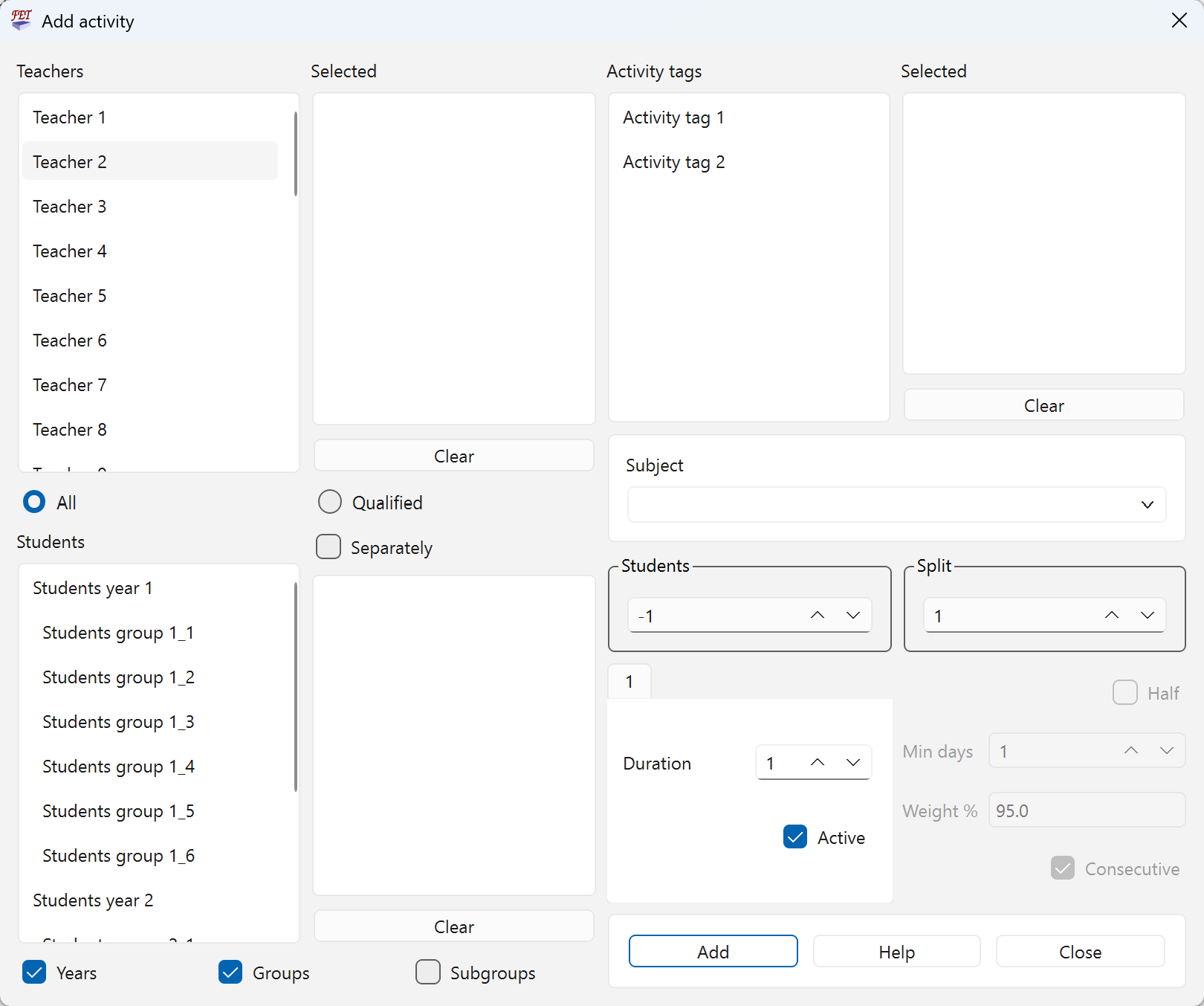
The required courses still belong to CSC6, so FET still keeps them apart. The electives can now move more freely. But they still need limits.
Step 2: keep electives away from required courses
FET has a rule called "A set of activity tags are not overlapping". It looks like exactly what you need. Add it with the tags "CSC6 required" and "CSC6 electives", at the weight 100%.
It works, but only partly. In the test runs, no elective took the time of a required course. But FET put 51 to 72 pairs of electives at the same time. That is even more than with the first attempt, which had 42 to 57.
Why? The rule compares activities that have different tags. It never compares two activities with the same tag. All 16 electives of CSC6 share the tag "CSC6 electives", so FET never checks them against each other.
Step 3: keep the electives apart
The missing piece is a second rule: "A set of activities are not overlapping". This rule checks every pair of activities in its list. Put all courses of CSC6 in it, at the weight 99.9%.
Why not 100%? At 100%, FET must keep every pair apart. The week is too short for that, so FET searches until its time limit and stops with "Time exceeded".
A weight below 100% is easy to misunderstand. It does not tell FET to keep 99.9% of the rule, and FET does not count the overlaps. It is the chance that FET checks the rule at each step. At 95%, FET skips the check too often, and in the test runs it made overlaps that were not necessary. At 99.9%, FET skips the check only very rarely. In the test runs, this gave the best results.
The results
With both rules, FET made the example timetable 10 times. Each run took less than a second.
- No elective took the time of a required course, in any run.
- The 9 groups had 21 to 24 pairs of electives at the same time, in total.
- 21 is the lowest possible number, and FET reached it in 7 of 10 runs.
For CSC6 alone, the result is easy to read. 18 courses compete for 15 blocks, so at least 3 pairs must share a block. FET reached exactly this minimum in all 10 runs: 3 pairs of electives, and both required courses free.
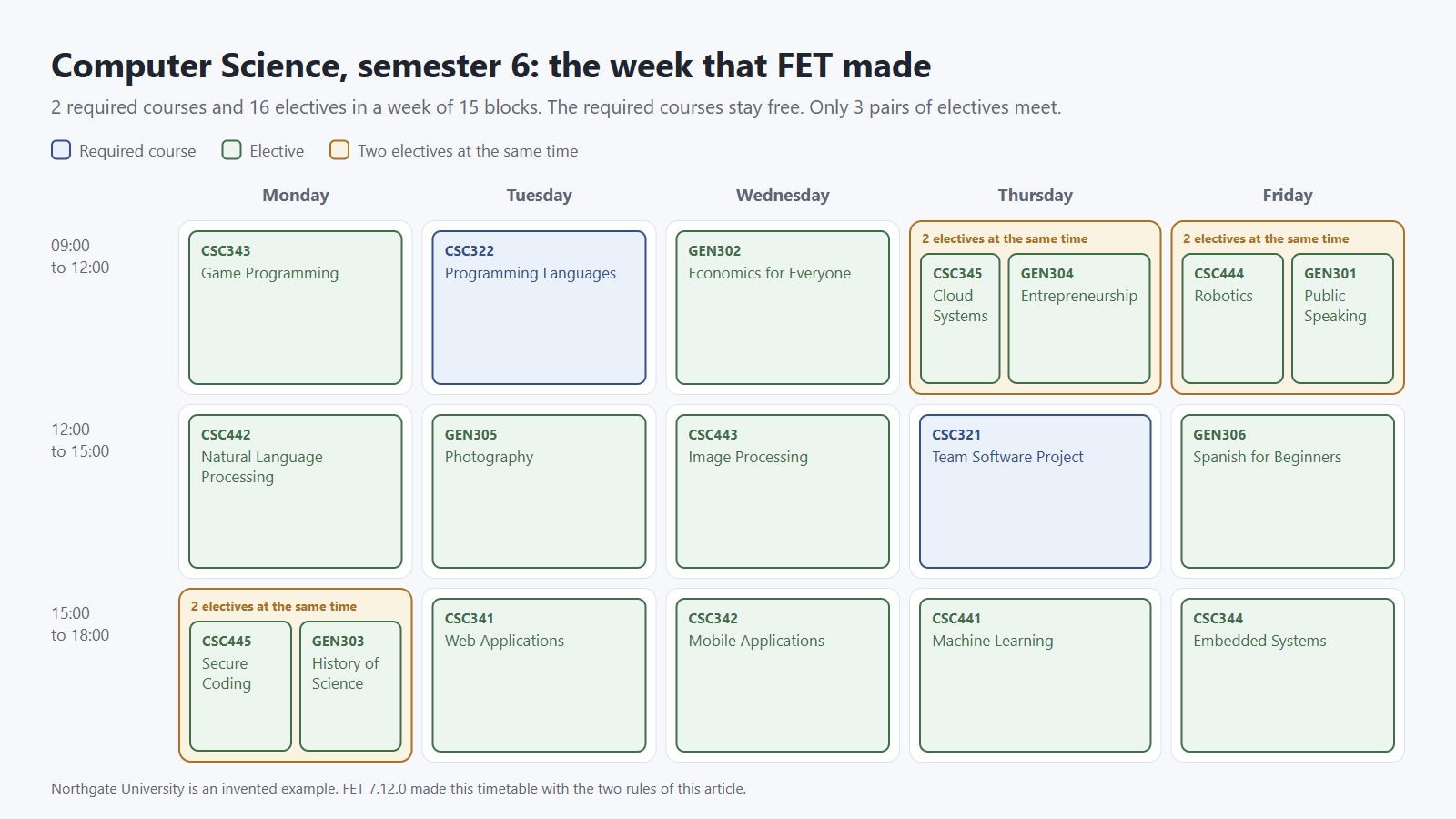
This is the result you want. The timetable does not pretend that every student can take every elective. It uses the short week as well as it can, and it protects the courses that everyone must attend.
How to set up electives in your FET file
- Add one student group for each semester of each program. In FET: Data → Students → Years (grades/forms/classes).
- Add one activity for each course. Give each elective every student group whose curriculum points to its list.
- Find the groups that do not fit. FET's message names them. The FET check on fetviewer.com also finds them in your browser.
- For each of these groups, remove the group from its electives and give them a tag, for example "CSC6 electives".
- Give the required courses of the same group a second tag, for example "CSC6 required".
- Add "A set of activity tags are not overlapping" at 100%, with these two tags.
- Add "A set of activities are not overlapping" at 99.9%. In the Filter, select CSC6 and click All. Then select the tag "CSC6 electives" and click All again. Check the list before you save.
- Generate. Then open the file soft_conflicts.txt in FET's results folder. It lists each overlap.
You find both rules in Data → Time constraints → Activities → Others (3).
Four practical details
The two rules do most of the work. But four details can make a real difference.
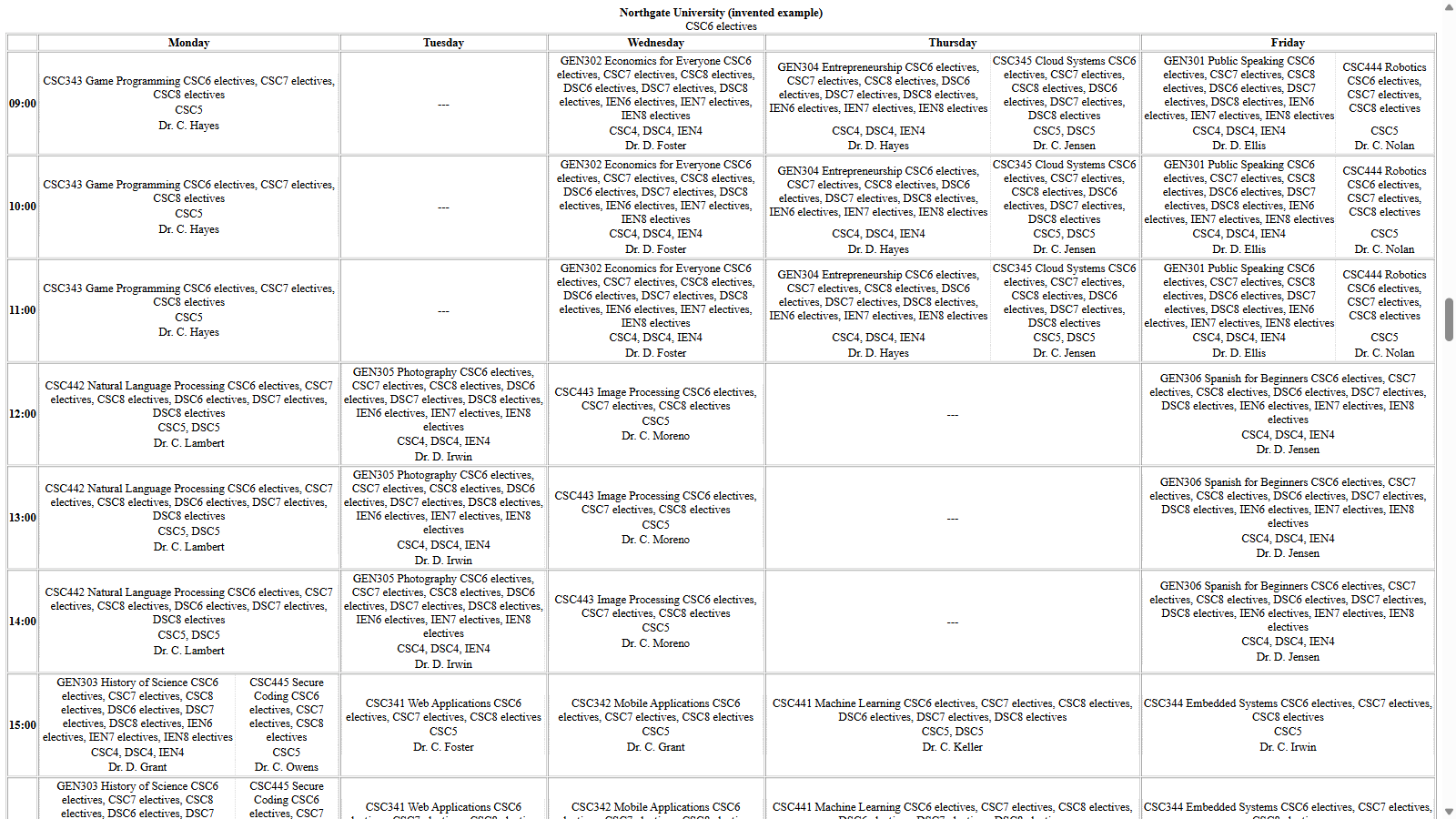
Keep the tags printable. In Data → Activity tags, leave both tags on "Printable". FET makes a timetable for each printable tag. Students then find their required courses in the CSC6 timetable, and their electives in the "CSC6 electives" timetable.
Give each elective a student count. Without a student group, an elective has no student count. In the activity dialog, type the expected number in the box "Students". FET then picks a room that is large enough.
Check the rules of the group. The rules of CSC6 no longer see its electives. For example, its not-available times do not apply to them. If these times matter, add "Activities preferred time slots" for the tag "CSC6 electives".
Required courses can be too many, too. Sometimes the required courses of a semester do not fit in the week either. Then you can remove the student group from some required courses as well, and add them to the second rule. FET keeps them apart when the week has room. The more activities you make flexible, the more carefully you must check the result.
What this method cannot do
FET does not know which electives each student will choose. So it cannot tell how many students an overlap affects.
Two electives at the same time may be a small problem if few students take both. It is a big problem if both are popular in the same program. So always read the overlap list before you publish the timetable. Students who repeat a course from an earlier semester may also need a personal check.
The method does not remove every overlap. It keeps the required courses free, and it keeps the electives apart whenever the week has room.
Try it yourself
Two example files are ready for you:
- northgate-university-before.fet: every group on every elective. FET stops before it starts.
- northgate-university.fet: both rules are in place. FET makes the timetable in less than a second.
Open the second file in FET, generate it, and look at the timetable for the tag "CSC6 electives".
A hard timetable problem does not always need a new tool. Often, the answer is to describe the real requirements more exactly, with the rules that FET already has.
Did you solve a similar problem in another way? Share it with other FET users on the FET forum.