
The constraint that makes your FET timetable impossible
One wrong constraint can make a FET file impossible, and the search can run for hours before you know. Check the file first. It is free and takes seconds.
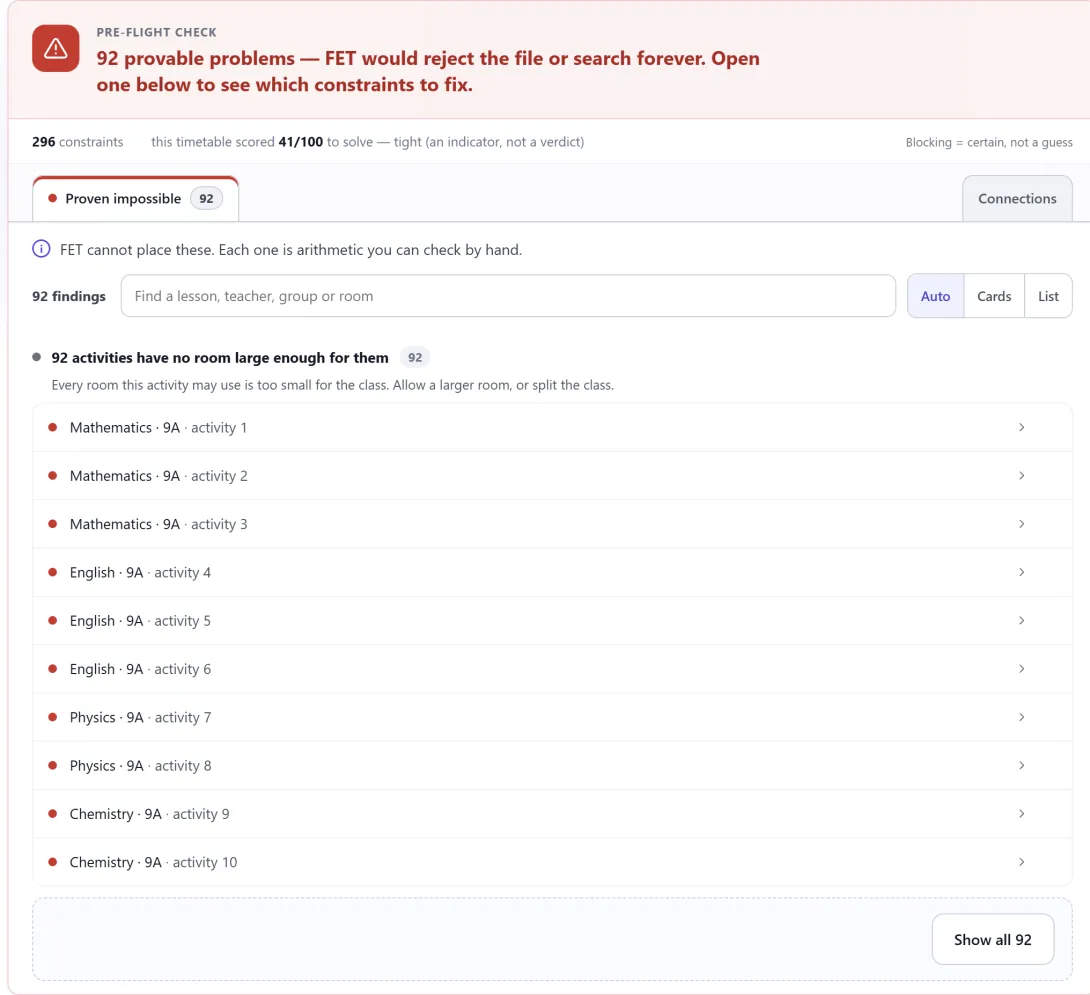
You finish the data. You press Generate in FET. Then you wait.
Ten minutes pass. An hour passes. The count of placed activities never reaches the total. In the end, you stop the generation and you have no timetable. Worse, you do not know why.
The problem is often one constraint
A school timetable has hundreds of constraints. Most of them are correct. One of them is not, and you cannot see it.
For example:
- A class of 31 students may use only rooms with 30 seats.
- A teacher has 26 hours of lessons, but is available for only 24 slots.
- A rule leaves an activity with no legal start time in the week.
- Four lessons must be on different days, but the student group studies on only three days.
Each of these makes the timetable impossible. No arrangement can satisfy it. But the file looks normal. FET opens it and starts to search.
Why the search does not tell you
FET is very good at its job. It searches for an arrangement that obeys every constraint. FET refuses some files at once. For many other problems, it starts a search that cannot succeed.
A search that fails tells you only one thing: this search did not find an arrangement. It cannot tell "your constraints make this impossible" from "I did not find it this time". So you change a weight, you try again, and you wait again.
That is where the hours go. The time goes to a search that could never succeed, not to the solving.
Count first, then search
There is a faster question to ask before you generate: is this timetable possible at all?
That question does not need a search. It needs arithmetic. The check reads your constraints and counts the room that they leave:
- the hours a teacher must teach, against the slots that stay available
- the start times an activity still has, after every rule is applied
- whether two lessons that must both happen are forced into the same slot
- whether a group of lessons needs more days than the week has
When one of these counts reaches zero, the timetable is impossible. That is not a guess about difficulty. It is a proof, and the check gives it in seconds.
It names the rule
A proof is only useful when you can act on it. Each finding says what is wrong, in plain words, and names the rules involved.
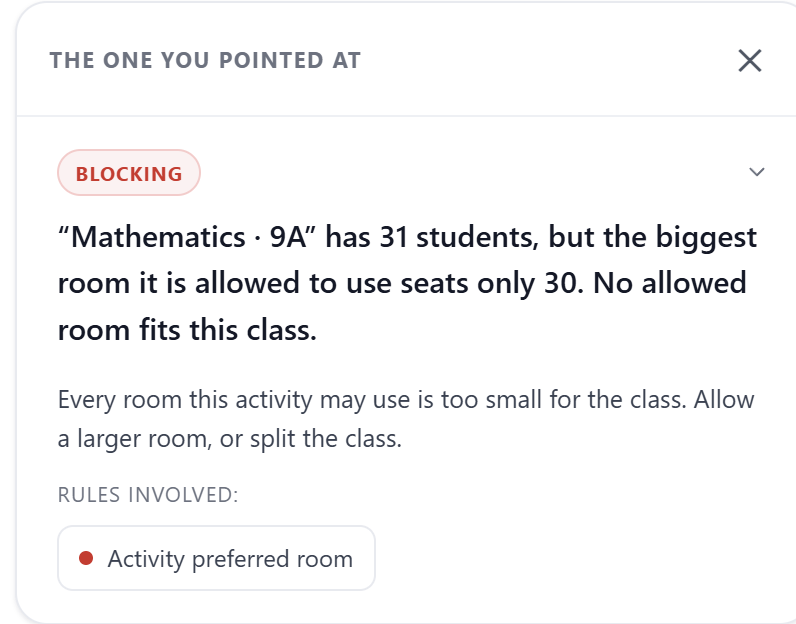
In the example above, Mathematics · 9A has 31 students. The biggest room that the Activity preferred room constraint allows has 30 seats. The fix is clear: allow a larger room, or split the class.
The findings are in groups. Proven impossible holds the problems that no solver can get past. The other groups hold likely mistakes and the things that make a file hard. Read more in The four kinds of finding.
Two places to use it
Without an account: the FET helper. Go to fetviewer.com/check and choose your .fet file. It is free and there is no limit on re-checks. Your file stays on your computer. Your browser sends only a summary to our server, and the summary holds no names: teachers, rooms and student groups travel as numbers. We store nothing. See Checking a file without an account.
Inside your account: Pre-flight. When you import your timetable, the Pre-flight page sits with the constraints on the data screen. Each constraints section also shows a one-line summary at the top. Change a constraint, and check again while you work. See What the pre-flight check does.
What it cannot tell you
The check proves the impossible cases. It cannot prove that a file will solve, and it cannot tell you how long FET will take. A clean check removes one reason for failure. The search is still FET's work.
So use both, in this order:
- Check the file.
- Correct what the check proves.
- Then let FET search.
Read the full comparison in How the check differs from letting FET solve.
Before the next long wait
The next time a generation runs for too long, stop it. Check the file first. If a constraint makes the timetable impossible, you find out in seconds, and you see which one.