
The activity log
Who changed what, and whether they were signed in or using a share link — the owner's record of everything written to a timetable.
Activity Logs is a record of changes made to a timetable. Despite the name it has nothing to do with activities in the sense of lessons — it is a change feed, and it lives under Views in the data navigation.
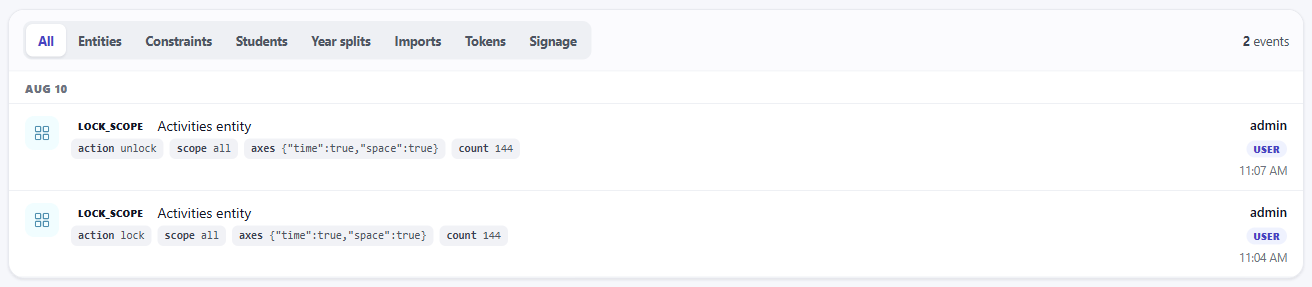
It is owner-only. A share link never opens it, however much access that link otherwise grants. A log that the people it records could edit would not be worth keeping.
What it shows
Changes newest first, grouped by day. Each row tells you three things: what changed, what was done to it, and who did it.
The feed covers edits to the resource lists, changes to constraints, work on the student-group tree, year divisions, imports, generated access links, and changes to embeds, screens and announcements. It also shows each TV that is connected, switched, renamed or disconnected. The filter along the top narrows to one of those when you already know roughly where to look.
Who, and how
The right-hand side of each row is the part worth knowing about.
A change made by a signed-in person shows their name. A change made through a share link shows Share token instead — because that is genuinely all that is known. A link is not a person; several people may hold the same one.
Alongside it is a short fingerprint identifying which link was used. It is derived from the link, not the link itself, so the log can tell one link from another — enough to answer which of my share links did this — without the log becoming a place your live links are written down.
That combination is the practical value of the page. When a room assignment changes and nobody remembers doing it, the log distinguishes a colleague signed in from someone holding the link you sent to the science department — and those have very different answers.
What it is not
It is not an undo. Nothing here can be reverted from this page. Undo lives in the topbar of the data screen and covers recent edits within a section; for anything older or larger, restore a backup.
It is not a complete forever-history. The page shows recent changes, not every change ever made. Treat it as a working record of what has been happening lately, not an archive.
It does not record reads. Someone opening a share link and looking at the timetable does not appear here — this is a log of writes. If you want to know how much a shared link is being used, the view counts on the sharing and display screens are the place to look.