
Downloading back to FET
Get your project back as a .fet file — and why it is checked before you are handed one.
Download .fet in the timetable menu rebuilds your project as a FET file and hands it to you. The row carries the sublabel checked first, which is the part worth explaining.
The file is checked before you get it
A .fet that FET refuses to open is worse than no file at all: you find out at the far end of the process, with no clue which of several thousand records is at fault.
So the project is built and inspected first, and what happens next depends on what the check finds.
If nothing is wrong
The download starts. There is nothing to read and nothing to confirm.
If something would make the file unusable
The download is held back and you are shown Can't download yet, with the list of what FET would reject. These are hard requirements — a project with no working days, or no hours, or an activity naming a teacher who is not in the teacher list, is not a file FET can open.
Fix the items listed and download again. The list names the actual missing values, so it points at the record rather than at the file.
Notice what is not on that list: things that can be safely defaulted — a missing duration, a missing activity id, a missing active flag — are filled in while the file is built, so they never become your problem. What surfaces is genuinely absent data that only you can supply.
If the file will open but looks thin
You get Heads up before download instead, with the concerns listed and a Download anyway button. The file is valid; something about it just looks sparse. This is advice, not a gate.
If the file is valid but the rules inside it are impossible
The same Heads up before download dialog appears, saying so in as many words: the file itself is valid — but the rules inside it are provably impossible. Alongside it sits the count from the pre-flight check and a way straight to the report.
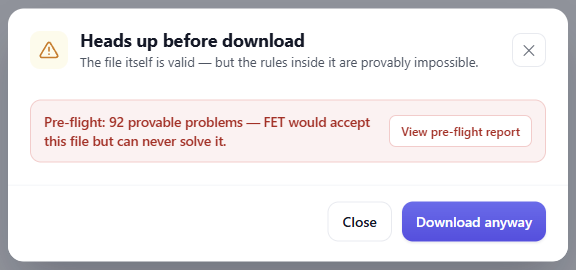
This is the one worth pausing on. Nothing here would stop FET opening the file — it is the timetable's own constraints that cannot all be satisfied at once, so FET would accept it and then search forever. Downloading is still allowed, because a file you are entitled to is a file you can have. But if you are about to hand it to the solver, read the report first.
If the check itself cannot run
The download proceeds. A check that failed to run has produced no opinion, and that is not a reason to stand between you and a file you are entitled to.
Timetables built from a CSV
A CSV row has no FET activity id, so a timetable imported from a spreadsheet starts without the stable identifiers that placement constraints need to point at individual lessons.
Rather than refusing, the export assigns those identifiers as it builds the file — and stores them, so they stay the same next time. In practice this means you can build a timetable from spreadsheets and still get a coherent .fet out, and a second download will match the first.
The other things in the menu
Download .fet is the round trip. The rest of Get data out are pictures of the current view rather than the project:
- Export PNG — the grid as an image, for pasting into something else.
- Export CSV — the current view as a spreadsheet. Availability depends on your plan.
- Print… — the print views, per rooms, teachers, student groups or activity tags.
If your goal is to carry on working in FET, Download .fet is the one you want.