
What the numbers count
The counting rules behind Insights — double lessons, shared classes, and why a teacher's bar may not mean what you assume.
Every figure here is arithmetic over your timetable, and arithmetic has conventions. These are the ones that surprise people.
A double lesson counts as its full length
A lesson lasting two periods occupies two periods, everywhere on this page. Loads, occupancy and hours all weight a longer lesson accordingly rather than counting it once because it is one entry in a list.
This is the behaviour you want and it is worth stating, because the same lesson counts as one against your plan's activity limit, which is a different question with a different answer. See Plans and limits.
Teaching periods are counted once, not once per person
The teaching-periods figure counts contact periods across the timetable. A lesson with two teachers, or one covering three classes, is counted once — it is one period of teaching happening.
That makes it a measure of how much teaching the school does, not a sum of individual workloads. If you add up every teacher's load you will get a larger number, and neither is wrong; they answer different questions.
Teacher load compares against a target where you have set one
If a teacher has a target number of hours recorded, their bar is read against it, and that is what makes "overloaded" meaningful.
Where no target is set, the bar shows the hours actually assigned instead.
So a full-looking bar can mean two different things — at or beyond an intended load, or simply the hours this person has, with nothing to compare against. If you want the comparison, set the targets; without them the page is describing rather than judging.
"Over" and "under" are not the same distance from target
A teacher counts as over as soon as they pass their target, but as under only below 70% of it. The two are deliberately unequal: someone at 94% of their target is not a problem worth flagging, so the range between the two is left unmarked. This is why the card can report nobody under while several bars sit visibly short of full.
Occupancy is measured against the grid you defined
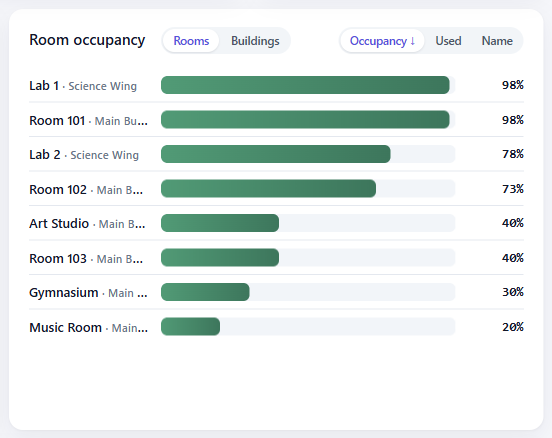
The occupied percentage is against the days and periods your timetable declares, not against a notional school week. A timetable that declares eight periods and uses six reads differently from one that declares six and uses six, even though the teaching is identical.
That is the right behaviour — it is your grid — but it means occupancy figures are not comparable between timetables with different shapes.
Gaps are counted inside the day, not around it
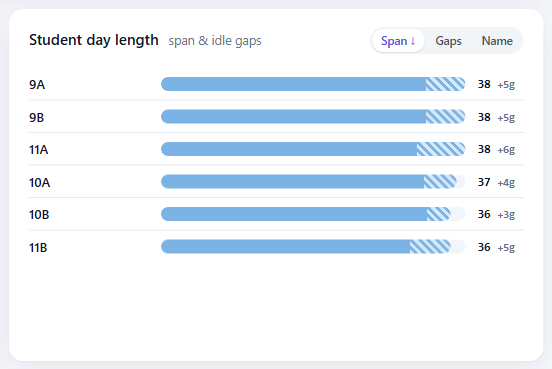
A day runs from the first lesson to the last, and the gaps are the free periods in between. Free time before the first lesson or after the last is not a gap — it is simply a shorter day.
The same rule is used for teachers and for classes, so the two are directly comparable. It also means a gap figure only ever describes waiting between commitments, which is the thing people actually object to.
Where to go next
- Reading the Insights view
- Plans and limits — the other place activities are counted, by a different rule.