
Subscribing to a calendar
Put a timetable into a phone or desktop calendar as a live subscription, for one teacher or one class rather than the whole school.
A printed timetable is out of date the moment something moves. A calendar subscription is not — the calendar app rechecks on its own, so a change here reaches the phone without anybody re-sending anything.
Subscribe, do not import
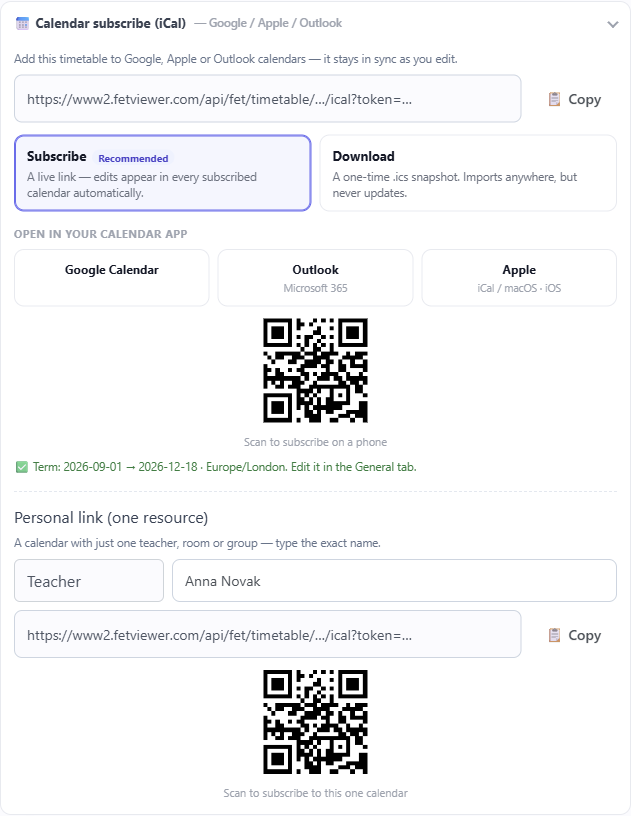
Calendar apps offer two things that look similar and are not:
- Subscribe to an address, and the calendar refetches it periodically. Changes arrive.
- Import a file once, and you get a frozen copy. Changes do not.
Use subscribe. Every calendar app has it, usually worded as "subscribe from URL", "add by URL" or "from internet".
How often it refreshes is the calendar app's decision, not ours. Some check hourly, some daily, and most cannot be forced. A subscription is right for "this stays roughly current", not for "this must be correct in the next five minutes".
One person's calendar, not the school's
A whole school in one calendar is unreadable. The feed can be narrowed to a single teacher, room or class, and that is almost always what you want — a teacher subscribing to their own lessons, a class calendar for a parent.
It needs a term window
The feed anchors the repeating week to real dates and repeats it weekly until the term ends, so it needs the same term start, end and time zone that dated printing uses. Without them it cannot know which real Monday to start from.
Both outputs read the same setting, so they can never disagree about which date a lesson falls on. If the calendar looks a week out, fix the term window rather than the feed.
Times and time zones
Events carry your timetable's time zone. Someone reading the calendar abroad sees the lesson at your school's local time, correctly adjusted, rather than at whatever hour it would be where they are standing.
Cover reaches the calendar too
The feed is not just the repeating week. Day-to-day changes are applied to the dates they belong to:
- A substitution or a room change replaces that day's occurrence, so the entry a teacher sees on that date is the one that is actually happening.
- A closure or non-teaching day removes the lesson from that date rather than leaving a phantom in the calendar.
- A teacher's own feed also gains the lessons they are covering — so cover you have been given turns up in your calendar without anyone telling you.
That last one is the reason a personal subscription is worth more than a printed sheet.
What it does not do
The feed is read-only. Editing an event in a calendar app changes nothing here, and the edit is overwritten the next time that app refreshes.
It is also only as current as the app's own refresh. For "what is happening right now", a screen is the honest tool — it refreshes itself in minutes rather than whenever a calendar app decides.