
Printing real dates
Turning the repeating week into a dated term calendar — the three layouts, the term window, and which settings stop applying.
A timetable is an abstract week. It says Monday period 3, not 17 September, and that is the right model — it repeats.
But some documents need dates: a term overview for a noticeboard, a calendar a parent can read, something to check a trip against. Switching the time frame to the term projects the repeating week onto real dates.
The term window
Dates come from your timetable's term start and end, alongside its time zone. Set them once in the timetable's settings and every dated output agrees.
If no window is set, a sensible one is assumed so you can see something — but the dates will not be your school's. Setting it properly is a minute's work and everything downstream depends on it.
Changing the dates on the print screen previews a different window without saving it. That is deliberate — the print screen can be reached with a share link, and a visitor previewing a date range must not be able to change your timetable's real settings. Saving is a separate, deliberate action.
Three layouts
- Weekly — one week per page, each dated. The closest to the familiar grid, and it keeps everything: breaks, notes, spanned lessons, transposing.
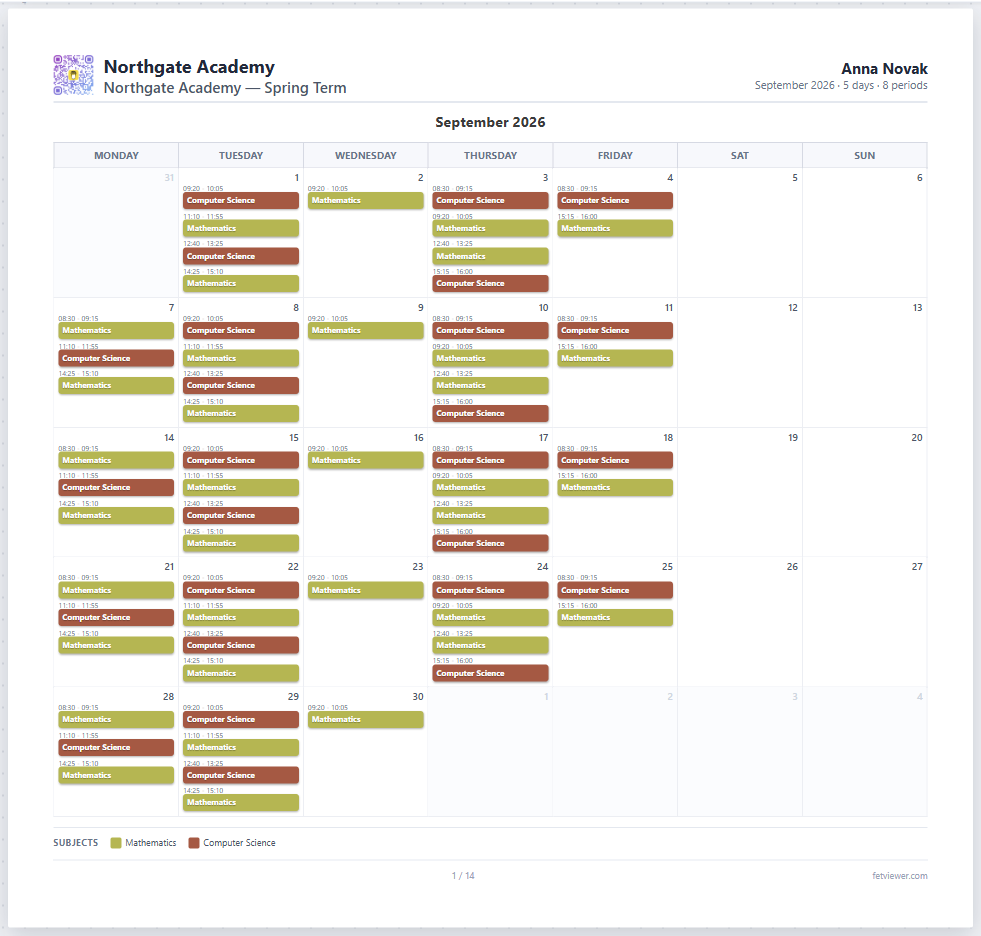
- Month — a month grid, the shape people recognise from a wall calendar. Good for an overview, poor for detail.
- Agenda — a dated day-by-day list, one block per month. The most readable for someone checking a specific date rather than a pattern.
What stops applying, and why
Month and agenda have no time rows — they are organised by date, not by period. Settings that only make sense against a time grid are hidden there rather than left to do nothing quietly: spanned lessons, break bands, the notes column and transposing.
If a control you were using disappears when you switch layout, that is why. Switch back to weekly and it returns.
Which real day is Monday
Days map to weekdays through your timetable's settings. That mapping is what makes a non-consecutive grid possible — a Monday/Wednesday/Friday timetable has three days in its grid, and only the mapping can say which real weekdays they are.
Get this wrong and every date on the calendar is wrong in the same direction, so it is worth checking against a known week before printing a term's worth.
Holidays
Non-teaching days are marked, so a dated calendar does not claim lessons on a day the school is shut.
Where to go next
- Subscribing to a calendar — the same dates, in a phone or desktop calendar.
- The print designer