
Reading the Insights view
Workload, room occupancy and where the week is busiest — read off the timetable you already have.
Insights answers questions about a timetable that exists: who is carrying the most, which rooms sit empty, and when the week is at its busiest.
Open it with Insights from the timetable's data screen.
Workload and utilisation, read off the current timetable.
What is on the page
Summary figures across the top — activities, teaching periods, teachers, rooms, groups, the size of the grid and how much of it is occupied. These are the numbers to quote when somebody asks how big the timetable is.
Teacher load as a sorted bar list, heaviest first. This is the section most people come for, and it is the fastest way to see an imbalance that nobody mentioned.
Room occupancy, also sorted, with a buildings view when your timetable has buildings. An underused room is often the answer to a constraint you were about to add.
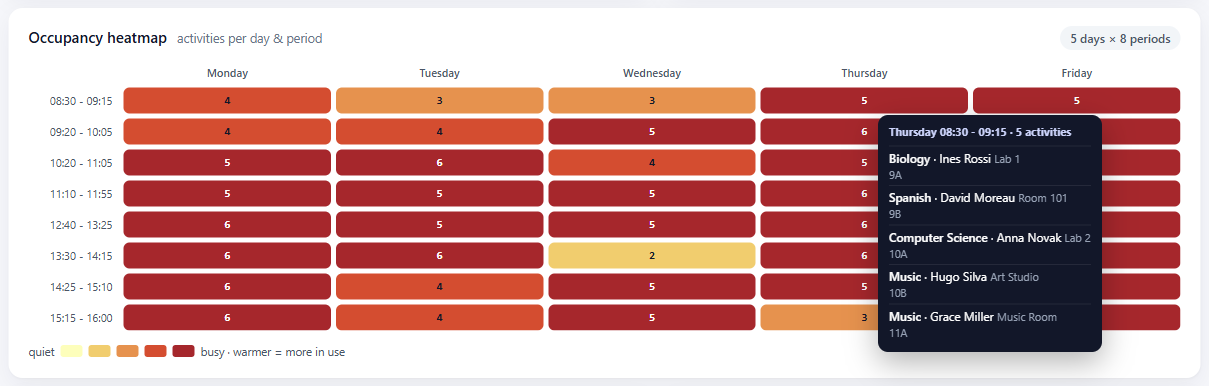
A day-by-period heatmap showing where the week is congested. Congestion is not itself a fault, but it is where a small change causes the most trouble, so it is worth knowing before you move something.
Top subjects, and student day length and gaps — how long a class's day runs and how much dead time sits inside it. That last one is the number students notice and timetables rarely report.
Hovering tells you more
Two places reward it:
- Hovering a teacher's bar shows that teacher's own week in miniature, so you can see when the load falls rather than only how much of it there is.
- Hovering a heatmap cell lists what is actually in that slot.
Both exist so you can ask "why is that number like that?" without leaving the page.
Taking it away
Export produces a spreadsheet of what is on screen, for a meeting, a report, or an argument about staffing. It is generated in your browser from the figures you are looking at.
It reflects the timetable now
The figures are read from the current timetable each time, so an edit is reflected the next time you open Insights. Nothing here is a stored report from a previous term.
Where to go next
- What the numbers count — the counting rules, which is where the surprises are.
- What the pre-flight check does — for a timetable that does not exist yet.